
Live Gallery App Installer (BETA)
Choose an install method below. You can use the self-contained installer for a guided setup, or install manually if you prefer to manage prerequisites yourself.
This is a BETA release of Live Gallery App. Please report any issues to hello@livegalleryapp.com.
Self-contained installer
This installer downloads and installs all necessary components (.NET 10 and Windows App SDK runtime 1.8+) automatically so you can run Live Gallery App without manual framework installation.
How to verify: After downloading, compare the SHA256 hash above with the value in LiveGalleryApp.Installer.exe.sha256 for security.
Download Auto Installer
Manual install
If you have issues with the auto installer, or you prefer to install prerequisites yourself, follow these manual steps.
- .NET 10 runtime is required; install it first.
- Windows App SDK runtime (1.8+) Windows App SDK runtime (1.8+)
- Download Live Gallery App app-bundle.zip and extract to a folder.
- Run Live Gallery App from the extracted folder.
Prerequisites: Windows 10 or later.
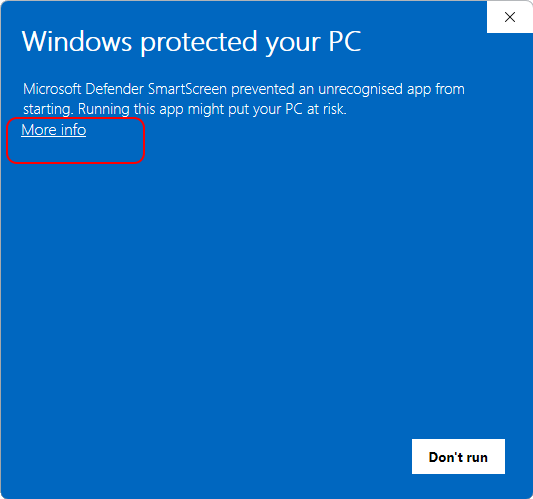
If you see a Windows SmartScreen warning:
Windows may show a SmartScreen warning when you run the installer for the first time. This is normal for new apps.
- Click More info (see below):
- Then click Run anyway:
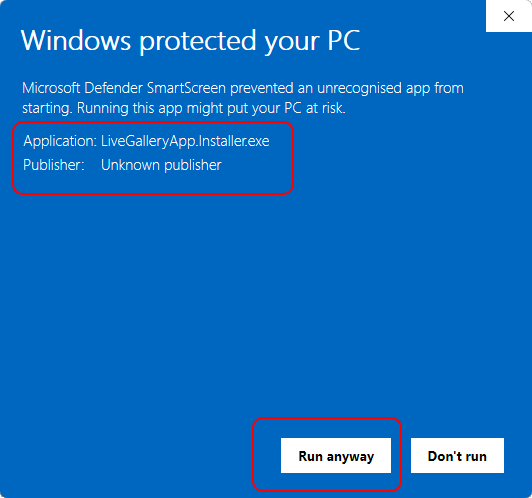
This allows you to install Live Gallery App safely. If you have any questions, contact support.